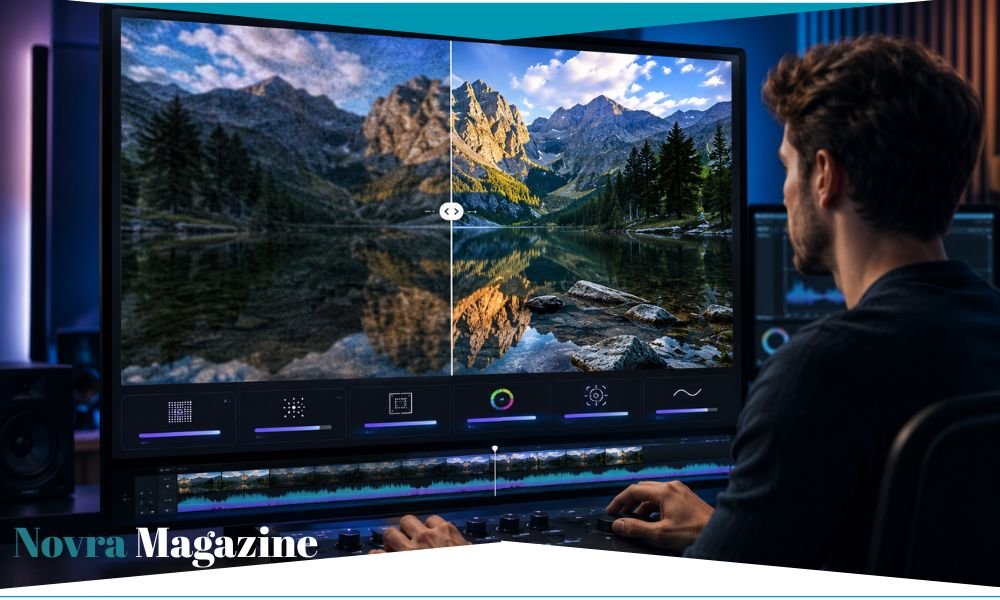
A blurry family clip, dark travel video, or weak social media post can feel impossible to save. However, Vidmud AI Video Enhancer says it can make these videos clearer with only a few clicks. The online tool promises to sharpen details, reduce noise, fix colours, and increase resolution up to 4K. Yet, users should understand what these claims mean before expecting an old video to look completely new.
| Quick Facts | Details |
|---|---|
| Tool name | Vidmud AI Video Enhancer |
| Main purpose | Improve the appearance and resolution of videos |
| Works online | Yes |
| Desktop version | Vidmud AI Studio for Windows |
| Main features | Upscaling, sharpening, noise reduction, and colour correction |
| Highest claimed output | Up to 4K |
| Online file limit shown | 200MB |
| Online duration limit shown | 20 minutes |
| Sign-up required online | The enhancer page says no |
| Watermark | The enhancer page says no watermark |
| Cost | Online enhancer is advertised as free; the wider Studio also has premium plans |
| Human review needed | Yes |
What Is Vidmud AI Video Enhancer?
Vidmud AI Video Enhancer is an online tool that tries to improve poor-quality video with artificial intelligence.
A user uploads a video, starts the process, and waits while the system studies the frames. Vidmud then creates an updated version for download.
The service says it can complete several jobs automatically:
- Increase video resolution
- Reduce digital noise
- Sharpen soft details
- Improve colour
- Adjust brightness and contrast
- Clean up some compression marks
- Improve low-light footage
No advanced editing knowledge is required for the online tool. This makes it attractive to people who want a quick result without learning large editing programs.
How Does Vidmud AI Video Enhancer Work?
A video is made from many still pictures called frames. These frames appear very quickly, which creates the feeling of movement.
Vidmud says its AI studies these frames and looks for weak areas. It may find blur, noise, low resolution, dark colours, or unclear edges.
Next, the tool predicts how the improved frames should look. It adds pixels, sharpens edges, and adjusts visual details.
Finally, it joins the changed frames back together as an enhanced video.
Let’s understand this simply. Imagine drawing a small picture and then making it much larger. If you only stretch it, the picture may look blocky. AI tries to guess what should appear between the original pixels.
Still, those new details are predictions. They were not truly captured by the original camera.
How Can You Use Vidmud AI Video Enhancer?
The online process appears simple.
Step 1: Open the Video Enhancer
Visit the Vidmud video enhancer page in a supported browser.
You should see an area where you can click or drag a video file.
Step 2: Upload Your Video
Choose the clip you want to improve.
The upload area currently lists M4V, MP4, MOV, and WebM as supported formats. It also shows a maximum file size of 200MB and a maximum duration of 20 minutes.
Step 3: Start the Enhancement
Click the button to begin.
Vidmud says its AI automatically chooses the needed improvements. Therefore, the online tool may not provide the same detailed controls as professional editing software.
Step 4: Review the Result
Watch the updated video from beginning to end.
Look closely at faces, hands, signs, product labels, hair, and moving objects. AI can sometimes create strange edges or false details in these areas.
Step 5: Download the Video
Save the result if it looks better.
Keep the original file as well. Do not replace your only copy until you have checked the enhanced version on different screens.
Can Vidmud Really Upscale Videos to 4K?
Vidmud says it can increase videos to 4K resolution.
However, 4K output size does not always mean true 4K camera detail.
Suppose the original video is very small and blurry. AI can make the frame larger and smooth some weak areas. It may also create sharper-looking lines.
Still, it cannot travel back in time and record information that the camera missed.
The result may look cleaner on a large screen. Yet, it may not match a video originally filmed with a good 4K camera.
For this reason, users should view 4K upscaling as an improvement process, not a perfect recovery method.
Can Vidmud Fix a Very Blurry Video?
It may improve mild blur, but results will depend on the original clip.
Slight softness may respond well to sharpening. Heavy motion blur is much harder because the subject moved while the camera captured the frame.
AI may guess the shape of a face, sign, or object. Sometimes the guess looks natural. At other times, it may create an artificial appearance.
A video with some visible detail gives the system more useful information. A clip with almost no clear detail may remain difficult to understand.
No enhancer can promise perfect results for every video.
How Does Vidmud Reduce Video Noise?
Noise often appears as moving dots or grain, especially in dark footage.
It happens when a camera does not capture enough light. Older phones, small camera sensors, and high camera settings may produce more noise.
Vidmud says its AI finds these unwanted patterns and reduces them while keeping useful details.
This can create a smoother picture. However, too much noise removal may also make skin, hair, grass, or fabric look soft.
The best result should reduce the distracting grain without turning the whole scene into a flat painting.
Can Vidmud Improve Dark Videos?
Vidmud says it can improve low-light footage and adjust brightness, colour, contrast, and saturation.
This may help when a clip looks slightly dark or dull.
However, making a dark video brighter can reveal more noise. Details hidden in a fully black area may also be impossible to recover.
Think about it like this: turning on a brighter screen cannot reveal an object the camera never captured.
AI may create a more pleasing image, but it cannot guarantee an exact copy of the real scene.
Does Vidmud Correct Video Colours?
According to its product page, Vidmud adjusts colour balance, contrast, brightness, and saturation.
This may help clips that look washed out, too yellow, too blue, or weak.
Automatic colour correction is useful for beginners because they do not need to move several editing controls.
Still, automatic changes may not match every creative style. A sunset could become too bright, while skin tones might look different from real life.
Always compare the new video with the original before sharing it.
Does Vidmud Increase Video Frame Rate?
The wider Vidmud AI Studio website says its desktop software can use AI to improve video frame rate.
Frame rate tells us how many pictures appear during one second of video. More frames can make movement look smoother.
AI frame creation works by producing new pictures between the real frames. This may help slow or uneven movement.
However, it may also create strange shapes around fast hands, water, hair, wheels, or other moving details.
The online enhancer page mainly focuses on upscaling, sharpening, noise removal, and colour. Therefore, users should check which frame-rate features are available in the exact version they use.
Is Vidmud AI Video Enhancer Free?
The online video enhancer page describes the service as completely free. It also says there are no hidden charges, sign-up steps, or watermarks.
However, Vidmud’s wider support section explains that Vidmud AI Studio has a free plan and paid monthly or yearly premium options. Some creative features may also use credits.
These statements may refer to different products. The basic online enhancer may be free, while the full desktop studio or other AI tools may offer paid features.
Therefore, check the current screen before uploading or processing a large project. Prices, limits, and free features can change.
Never assume that every tool under the Vidmud name has the same payment rules.
Does Vidmud Add a Watermark?
The official online enhancer page says downloaded videos do not include a Vidmud watermark.
That can be useful for social posts, personal projects, presentations, and business content.
However, always preview the finished file. Product rules can change, and another Vidmud feature may have different limits.
A watermark-free download does not automatically give permission to use every part of the video. You still need rights to the original footage, people, music, logos, and other protected material.
Which Video Formats Does Vidmud Support?
The upload section currently lists these formats:
- M4V
- MP4
- MOV
- WebM
Another section on the same page also mentions AVI. Because the information is not fully consistent, support may depend on the browser, tool version, or file settings.
MP4 is usually the easiest format to try because it works across many websites and devices.
If an upload fails, converting a copy of the video to MP4 may help. Keep the original file safe before changing its format.
What Are Vidmud’s File and Length Limits?
The online upload area currently shows two main limits:
- Maximum duration: 20 minutes
- Maximum file size: 200MB
A video can be shorter than 20 minutes but still exceed 200MB. High-resolution clips often use more storage.
Likewise, a heavily compressed video may stay under 200MB even when it is fairly long.
If a file is too large, you may need to trim it or create a smaller copy. Avoid heavy compression because it can remove more detail before enhancement begins.
These limits may change, so check the upload page before starting.
How Fast Is Vidmud AI Video Enhancer?
Vidmud says a one-minute video often processes in less than 30 seconds. It also claims that longer videos rarely take more than a minute.
However, real processing time may change.
It can depend on:
- Video length
- File size
- Original resolution
- Internet speed
- Browser performance
- Server demand
- Type of enhancement
- Output resolution
A short, simple clip will usually process faster than a long 4K file.
Users should treat speed statements as product claims, not a guaranteed time for every upload.
Do You Need to Create an Account?
The online video enhancer page says users do not need to create an account or provide an email address.
This can make quick testing easier.
However, the wider Vidmud service also includes accounts, billing pages, credits, and premium features. These may apply to the desktop studio or other tools.
In simple words, the exact sign-up requirement depends on which Vidmud feature you choose.
Read the page carefully before uploading your file.
Is Vidmud AI Video Enhancer Safe?
Vidmud says online uploads are processed securely and deleted automatically. Its terms also state that it does not store user input.
Those are positive claims. However, users must still make careful choices whenever they upload files to an online service.
Avoid uploading videos containing:
- Private identity documents
- Bank information
- Medical records
- Home addresses
- School information
- Confidential business material
- Intimate content
- Children’s private moments
- Footage you do not own
If a video is highly private, an offline editor may offer more control because the file can remain on your own computer.
Read the current privacy policy and terms before uploading sensitive material. Website policies may change.
What Does Vidmud Say About User Responsibility?
Vidmud’s terms say users must check AI output for accuracy and suitability before sharing it.
The terms also warn that output may be incomplete or incorrect. This is important because AI enhancement can create details that were not present in the source.
Users are responsible for the files they upload and the results they publish.
You should not use the tool to copy someone’s face, misuse private footage, or break another person’s rights.
The terms also say users should not claim that AI-generated output was fully human-made.
Can You Use Vidmud for Personal Videos?
Yes, it may be helpful for ordinary personal clips.
Possible uses include:
- Old family recordings
- Holiday videos
- Birthday clips
- Graduation footage
- Wedding videos
- Pet videos
- Dark phone recordings
- Compressed messaging-app clips
Start with a short copy of the video. This allows you to check the result without risking the original memory.
Be careful with old family footage. Heavy enhancement can change small facial details and make people look slightly different.
Is Vidmud Useful for Social Media?
It may help clean up videos before posting them on TikTok, Instagram, Facebook, or YouTube.
For example, it can improve a clip that became soft after being sent through a messaging app.
Still, social platforms compress videos during upload. A huge 4K file may not always create a much better social post.
The story, opening, sound, and message are also important. A sharp but boring video may still receive little attention.
Use enhancement to support good content rather than depending on image quality alone.
Can Businesses Use Vidmud AI Video Enhancer?
Businesses may find it useful for product clips, ads, training videos, social posts, and presentations.
A small shop could clean up a product recording made on a phone. A creator might improve an older clip before reusing it.
However, commercial users should confirm the current licence terms for their planned use.
They should also check every product detail. AI must not change a label, colour, material, button, or feature in a way that could mislead buyers.
A cleaner product video is useful. A false product video can cause returns and damage trust.
Can Vidmud Restore Old Family Videos?
It may make some old clips easier to watch.
Noise removal can clean visible grain. Upscaling may help the video fit a modern screen, while colour adjustment can improve dull footage.
Yet, restoration has limits.
A badly damaged tape, missing frame, or heavily blurred face may not return to its original form. AI may create a likely-looking detail instead.
For valuable family memories, keep the unedited master file and create a separate enhanced copy.
Can Vidmud Repair Compressed Videos?
Compression removes information to make a file smaller. It can create blocks, soft edges, colour bands, and unclear movement.
Vidmud may reduce the appearance of some compression problems.
However, once original information has been removed, the enhancer cannot recover it with complete certainty.
The result may look smoother and sharper, but it is still a rebuilt version.
For future videos, keep a high-quality original before sending or posting compressed copies.
What Are the Main Benefits of Vidmud?
The biggest attraction is simplicity.
The online tool says it can manage several enhancement tasks without manual controls.
Possible benefits include:
- Simple upload process
- No advanced editing knowledge needed
- Automatic enhancement
- Claimed 4K upscaling
- Noise reduction
- Sharpening
- Colour correction
- Online access
- No account for the basic enhancer
- No claimed watermark
- Support for common formats
- A free entry point
These features may make it useful for quick and simple projects.
What Are the Main Limits of Vidmud?
Automatic tools give users less control.
A professional editor may want to choose the exact strength of sharpening, noise reduction, colour changes, and frame processing.
Other possible limits include:
- Results depend on the source video
- AI may invent small details
- Heavy blur may remain
- Faces can look unnatural
- Text may change
- Processing time can vary
- File and duration limits apply
- Format details appear inconsistent
- Online uploads may not suit private files
- Free and premium rules may differ by feature
- Independent long-term reviews remain limited
Because Vidmud appears to be a newer tool, there is less trusted independent testing than there is for some older editing programs.
Users should test it with a short, non-private clip before depending on it for important work.
How Can You Get Better Results With Vidmud?
Start with the best original video available.
Do not use a copy that has already passed through several messaging apps if the camera file still exists.
Try these simple steps:
- Use the original recording.
- Trim parts you do not need.
- Keep a backup.
- Upload a short test clip first.
- Use a common format such as MP4.
- Check faces and moving objects.
- Look for false text or edges.
- Compare the result with the original.
- Test it on a phone and larger screen.
- Save the enhanced file under a new name.
A good source gives the AI more real information to work with.
What Should You Check After Enhancement?
Do not judge the result from one still picture.
Watch the complete video at normal speed. Then watch important parts slowly.
Check for:
- Flickering
- Strange skin texture
- Changed facial features
- Double edges
- Bent objects
- False letters
- Colour changes
- Missing details
- Unnatural movement
- Sound problems
- Audio delay
- New compression marks
A video can look sharp in one frame but unstable during movement.
The best result should look clear and natural from beginning to end.
Is Vidmud Better Than Normal Video Editing?
The two methods serve different needs.
Vidmud focuses on quick automatic improvement. Traditional editing software gives users more detailed control.
An AI enhancer may suit:
- Beginners
- Quick social clips
- Small personal projects
- Automatic clean-up
- Simple resolution changes
A full editor may suit:
- Professional films
- Careful colour work
- Long projects
- Advanced sound editing
- Detailed control
- Private offline work
Some creators may use both. They can improve the clip with AI and then complete the final edit in another program.
Should You Trust Every Claim About 4K Enhancement?
No tool should be judged only by a large resolution number.
A 4K file contains more pixels than a 1080p file. However, more pixels do not always mean more true detail.
AI fills the larger frame by studying patterns and making predictions.
This can look impressive, especially when the original is only slightly soft. Yet, a very poor source may still show weak or invented details.
The best test is your own short clip. Compare faces, text, movement, and fine objects instead of only checking the resolution label.
Who May Find Vidmud Most Useful?
Vidmud may appeal to:
- Beginners
- Students
- Social media creators
- Small businesses
- Online sellers
- Family video keepers
- Bloggers
- Marketing teams
- People with old phone clips
Professional editors may still want more controls and a stronger offline workflow.
The tool seems best suited to people who value speed and simplicity.
Who Should Be More Careful?
People handling private or highly important footage should take extra care.
This includes medical, legal, school, identity, security, and confidential business videos.
Users should also avoid treating an enhanced frame as proof of a hidden detail. AI may create a likely shape that was not truly recorded.
For example, do not use AI enhancement to identify a person, read an unclear number plate, or make an important legal claim without expert checks.
A sharper image is not always a more truthful image.
Is Vidmud AI Video Enhancer Worth Trying?
Vidmud may be worth testing if you have a short, non-private video that looks soft, noisy, dark, or low in resolution.
The simple online process lowers the starting barrier. Its claimed free use and watermark-free output also make it interesting for beginners.
However, do not expect a miracle.
Try a small clip first. Compare the output carefully and decide whether the changes look natural.
For important professional work, compare it with other tools and keep your original file.
Final Thoughts
Vidmud AI Video Enhancer offers a simple way to improve weak video without learning difficult editing software.
Its official page says the tool can upscale clips to 4K, reduce noise, sharpen details, and correct colours. It also advertises free online use without sign-up or a watermark.
However, AI cannot perfectly recover information that the original camera never captured. It may guess or rebuild missing details instead.
Users should also notice the differences between the free online enhancer and the wider Vidmud AI Studio, which includes free and premium options.
The safest approach is simple: use a copy, avoid private footage, test a short clip, and review every frame before sharing the result.
Frequently Asked Questions
What is Vidmud AI Video Enhancer?
It is an online AI tool designed to upscale videos, reduce noise, sharpen details, and improve colour.
Is Vidmud AI Video Enhancer free?
Its online enhancer page advertises free use. However, the wider Vidmud AI Studio also offers premium plans and credit-based features.
Does Vidmud require an account?
The basic online video enhancer says no account is required. Other Vidmud services may use accounts.
Can Vidmud upscale a video to 4K?
Vidmud says it can create output up to 4K. However, upscaling cannot perfectly recover details that were missing from the original recording.
Does Vidmud remove watermarks from its output?
The online enhancer page says it does not add a Vidmud watermark to enhanced videos.
What is the largest video I can upload?
The upload page currently shows a maximum file size of 200MB and a maximum length of 20 minutes.
Which video formats does Vidmud support?
The upload area lists M4V, MP4, MOV, and WebM. Another part of the page also mentions AVI, so support may vary.
Can Vidmud fix a very blurry face?
It may improve mild blur. However, heavy blur may remain, and AI could create facial details that are not accurate.
Is Vidmud safe for private videos?
Vidmud says it does not store uploaded input. Even so, highly private or confidential footage is safer with a trusted offline process.
Can I use Vidmud for business videos?
It may help with product and marketing clips. Check the current licence terms and make sure enhancement does not change important product details.
Does Vidmud work on a phone?
The online tool says it works through browsers on mobile and desktop devices. Real performance may depend on the browser, device, and file size.
Does Vidmud have a desktop application?
Yes. Vidmud advertises AI Studio for 64-bit Windows 10 and Windows 11 systems.
Can Vidmud improve old family recordings?
It may reduce noise, sharpen the picture, and improve colour. Still, very damaged or missing details may not return accurately.
Is an enhanced 4K video the same as native 4K footage?
No. Native 4K records real detail at the time of filming. AI-upscaled 4K uses software to estimate and add detail.
For more info, visit novra magazine